How to Use Broadcast Channel API in React

In today’s web applications, keeping information updated across multiple tabs or windows can greatly enhance the user experience. For instance, if a user logs out in one tab, you want that action to be reflected in all other tabs. The Broadcast Channel API makes this easy by allowing communication between different browsing contexts of the same origin. This article will guide you on how to use this API in a React application.
What is the Broadcast Channel API?
The Broadcast Channel API is a simple method to enable communication between different tabs, windows, or iframes of the same website. It allows you to broadcast messages to all other contexts listening on the same channel, making it ideal for real-time updates and synchronization.
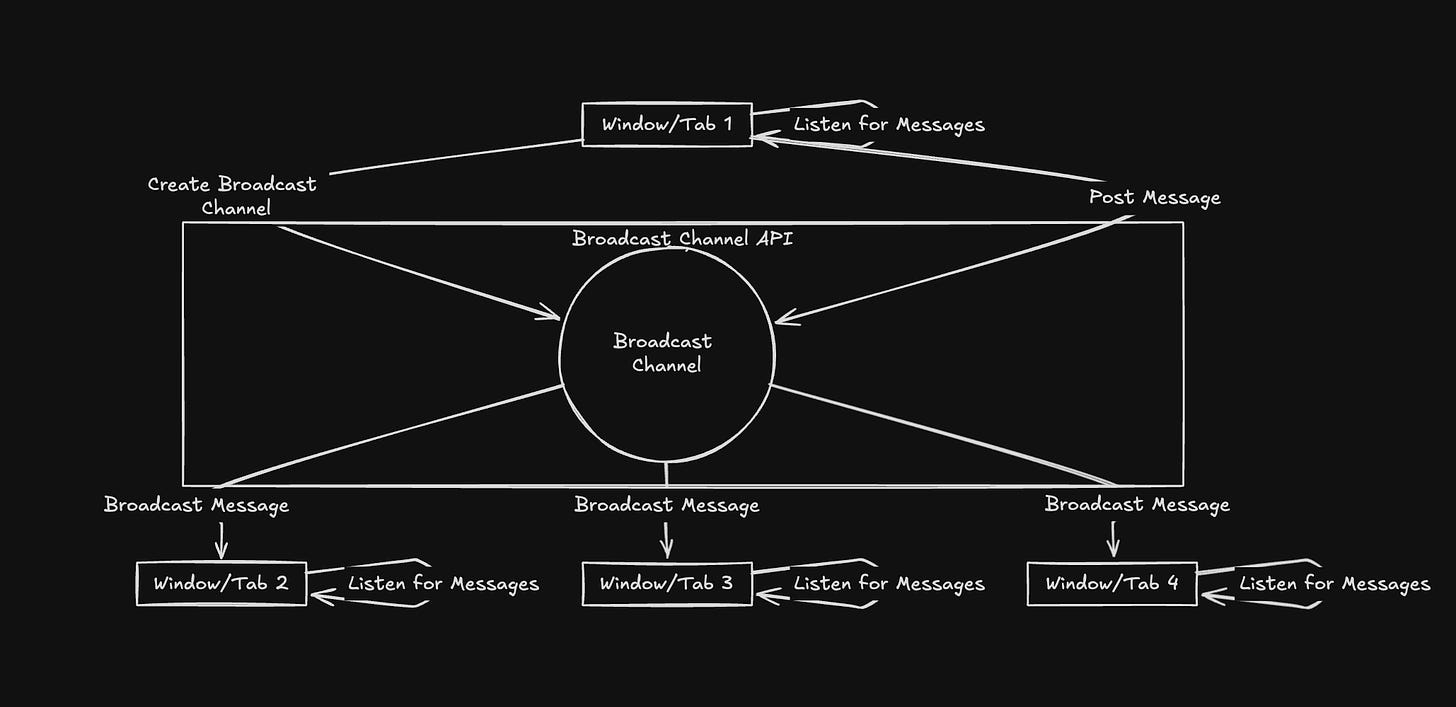
Why Use It?
• Real-Time Updates: Sync data like user sessions across different tabs.
• Ease of Integration: Simple to add to your existing React app.
• No Additional Libraries: Functions natively in modern browsers without extra dependencies.
Setting Up the Broadcast Channel API in React
Let’s walk through how to use the Broadcast Channel API in a React application by creating a custom hook to manage communication.
Create a Custom Hook
First, create a custom hook named useBroadcastChannel to encapsulate the Broadcast Channel logic.
import { useEffect, useState } from 'react';

const useBroadcastChannel = (channelName) => {
    const [message, setMessage] = useState(null);
    const channel = new BroadcastChannel(channelName);

    useEffect(() => {
        const handleMessage = (event) => {
            setMessage(event.data);
        };

        channel.onmessage = handleMessage;

        // Clean up the channel when the component unmounts
        return () => {
            channel.close();
        };
    }, [channel]);

    const sendMessage = (msg) => {
        channel.postMessage(msg);
    };

    return { message, sendMessage };
};

export default useBroadcastChannel;
This hook creates a new BroadcastChannel, listens for incoming messages, and provides a function to send messages.
Use the Hook in a React Component
Let’s use our custom hook in a React component to manage login sessions across different tabs.
import React, { useEffect } from 'react';
import useBroadcastChannel from './useBroadcastChannel';

const AuthManager = () => {
    const { message, sendMessage } = useBroadcastChannel('auth_channel');

    const handleLogin = () => {
        // Notify all tabs that the user has logged in
        sendMessage({ type: 'login', user: 'JohnDoe' });
    };

    const handleLogout = () => {
        // Notify all tabs that the user has logged out
        sendMessage({ type: 'logout' });
    };

    useEffect(() => {
        if (message) {
            if (message.type === 'logout') {
                alert('You have been logged out in another tab!');
            }
        }
    }, [message]);

    return (
        <div>
            <h1>Authentication Manager</h1>
            <button onClick={handleLogin}>Log In</button>
            <button onClick={handleLogout}>Log Out</button>
        </div>
    );
};

export default AuthManager;
This AuthManager component uses the useBroadcastChannel hook to handle user authentication state across tabs. When a user logs in or out, a message is sent to all other tabs on the auth_channel channel. If a logout message is received in any tab, it triggers an alert to notify the user.
Conclusion
The Broadcast Channel API provides a straightforward way to synchronize data across multiple tabs or windows in your web applications. By using a custom React hook, you can easily manage real-time messaging and improve user experience. Whether you’re handling login states or syncing other types of data, the Broadcast Channel API simplifies cross-tab communication.
Further Reading
• MDN Web Docs on Broadcast Channel API